
Common tools simplified for ease of use.
Use it for:
IMPORTANT: Power off the ControlBox before connecting!
Configuration complete. You can now close the box and power the system back on.
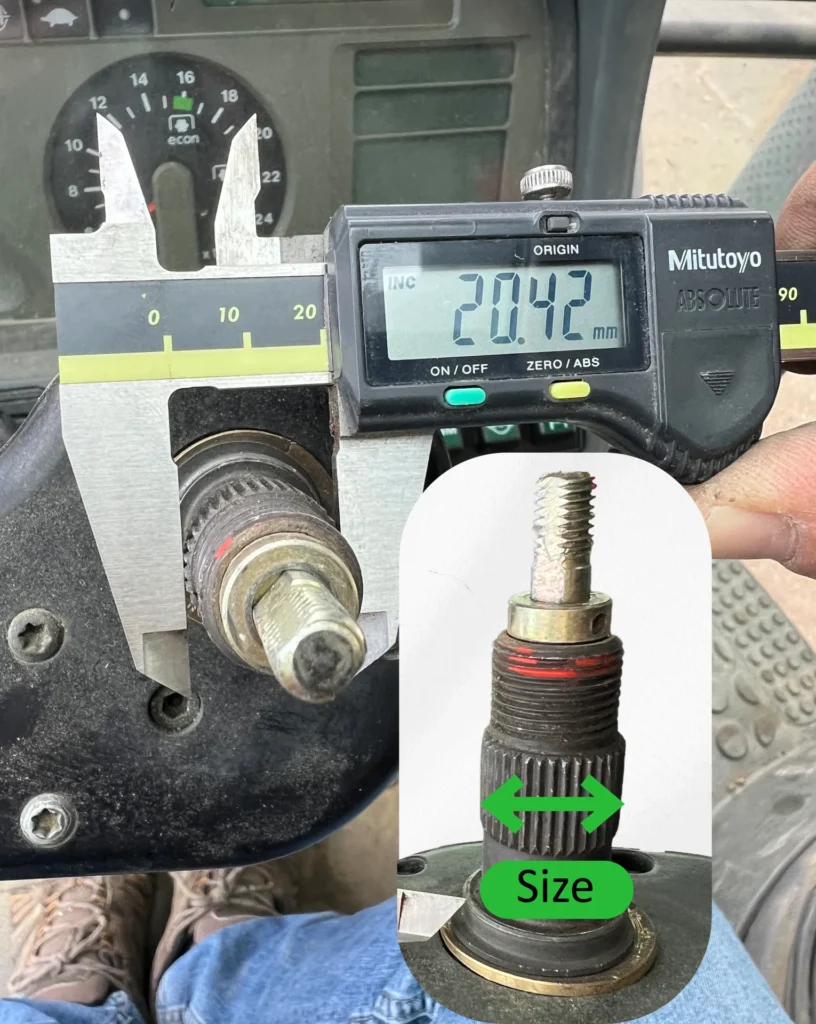
To ensure you select the correct adapter, the most reliable method is to remove the steering wheel and measure the diameter of the splined shaft, as shown in the image.
In most cases, the spline count is 36; therefore, the diameter is the determining factor. Based on our experience, dimensions are consistent across certain brands.
Models for which the data in the table below are highly reliable:
John Deere and newer machines from the CNH Group: A+
Claas and Massey Ferguson: N
| Adapter Model | Tractor Brands & Models | Adapters teeth no. | Adapters size |
|---|---|---|---|
|
A+ |
CNH group newer:
|
36 |
21.8-22.1 |
|
D |
|
36 |
20.4 |
|
K |
|
36 |
17.8 |
|
N |
|
36 |
15.8 |
|
B |
|
36 |
18.2 |
|
W |
|
36 |
18.5 |
|
F |
|
single key |
24.5 |
|
NH40 |
older ones:
|
40 |
17.7 |
|
T |
|
18 |
15.45 |
|
G |
RARE:
|
36 |
15.6 |
|
C |
|
single key (conical) |
23.33-25.4 |
|
BENZ- 72S |
|
72 |
23.5 |
Add an external 4G router to your kit if: