
Yes. The software that ensures operation has been developed for nearly 10 years by farmers with excellent technical knowledge who work with tractors on a daily basis. This continuous testing and incremental development have resulted in extremely high-quality steering and features. Due to its open-source nature, the software is completely free, so the customer really only pays for the physical devices. The hardware was assembled from components with excellent price-performance ratios after much experimentation and careful selection. Although the modular design might seem like a simpler version at first glance, the system provides service of impeccable quality in practice.
Our system is based on the globally popular, open-source AgOpenGPS software. Our mission is to provide farmers with an affordable, professional precision farming tool. By scouring internet forums, anyone can put the system together, but this often involves long part hunts, soldering electronics, and crimping cables. We provide a complete hardware package pre-assembled, programmed, and tested in our workshop (a Plug & Play style kit) that you “”only”” need to install into the machine.
Absolutely! If you’re not yet ready to invest in automatic steering, the AgOpen guidance system is an excellent way to start using the system. This package provides ±2.5 cm accuracy to support manual steering. It can be expanded into a full robot steering system at any time in the future by utilizing the hardware (RTK/GPS receiver and tablet).
Our most popular package includes everything needed for immediate work: Control Box: with the latest V4.5 panel, built-in UM982 (3-band) RTK receiver, and the extremely precise TM171 tilt sensor (IMU). Wiring Harness: with connectors and built-in activation/main switch buttons. Steering Unit: available in Direct Drive or Geared versions. Wheel Angle Sensor (WAS): including mounting elements. Display: impact- and dust-resistant industrial Windows tablet (e.g., Panasonic CF-20 or Dell 7202) with a stable mounting bracket and charger.
Yes, parts can be purchased separately in the webshop (e.g., just the wiring harness, just the control box without RTK, or just the direct drive motor with an adapter). This is particularly useful if you have already built your own system but want to supplement it with a professional direct drive motor or a reliable control box.
No, not at all necessary! A great advantage of the AgOpenGPS system is its flexibility. As a cost-effective solution for a second machine, we recommend purchasing only the fixed components (wheel angle sensor, wiring harness, antenna). The more expensive components, like the tablet and the control box, can be comfortably and quickly transferred between the two machines. Moving the steering motor is a bit more cumbersome; we only recommend this transfer if it happens at most once or twice a year (e.g., at the change of seasons).
The default and most cost-effective payment method is bank transfer (Wire Transfer). After placing an order, our system generates a Proforma invoice and sends the bank details; in many countries, it’s possible to transfer to a local bank account. If you wish to pay by credit card or Apple Pay, this is possible via the Wise system—please indicate this in the order comments section, and we will send a secure payment link. (Note: card payments carry a +3% bank transaction fee).
No problem if you don’t want to pay in Euros (EUR)! You can change the currency on the right side of the webshop. We accept payments in USD, GBP, CAD, AUD, and RON, for which we provide local (domestic) bank account numbers for fast and cheap transfers.
If you have a valid community tax number (e.g., starting with HU, RO, FR, IT, etc., registered in the VIES system), the system automatically calculates 0% VAT upon entering it on the Checkout page. If the website should indicate an error for your tax number for some reason, feel free to place the order, enter the tax number in the comments, and we will manually deduct the VAT from the proforma invoice.
We ship worldwide using the UPS courier service! Many of our packages are running in every country in Europe, the United States, Canada, Australia, and even Japan and New Caledonia. In-stock items are dispatched within 1-3 business days after payment is received. Shipping time within Europe is usually 2-4 business days, and overseas 4-8 business days. Shipping fees are tied to the courier companies’ rates and are visible on the payment page.
For shipments outside the European Union, VAT is automatically 0%. However, upon arrival in the destination country, local authorities may impose import duties and local taxes. UPS fully handles the customs clearance for you, and the arising (usually minor) costs must be paid to them upon delivery. For our UK customers, we specifically recommend obtaining a GB EORI number, which allows for Postponed VAT Accounting (PVA), and ensures the package doesn’t get stuck at the border. For shipments to Turkey, we are happy to issue an A.TR certificate of origin, which provides duty-free status.
Practically on any machine! Whether it’s John Deere, Case IH, New Holland, Massey Ferguson, Valtra, Claas, Fendt, Steyr, Deutz-Fahr, or Lamborghini tractors, the system fits. Moreover, our system works excellently on older, simpler machines (e.g., MTZ, Zetor, old Fiat or Pasquali), as well as combines and self-propelled sprayers (e.g., Bateman, Evrard).
This is the most important step before ordering! The most reliable method is to remove the tractor’s factory steering wheel and measure the outer diameter of the splined part of the steering shaft, and possibly count the number of teeth (splines) on it. There is a visual, tabular guide on the direct drive motor kit page, and an adapter selection table is also among the product images. If you accidentally choose the wrong one, we will send a replacement part via express mail at a discount.
The system is successfully used on numerous 30-50 year old tractors (e.g., MTZ 80/82). Large mechanical backlash is no obstacle; in such cases, instead of 2.5 cm accuracy, the machine will move in a ±5 cm band, which is still a huge help for most operations. We primarily recommend the system for machines with orbital steering, though users have had success with non-orbital machines that have easier steering. In such cases, we definitely recommend the Direct Drive kit with its strong and more sophisticated motor control.
If your machine already has a factory-installed hydraulic steering valve and wheel angle sensor, you don’t need a motor mounted on the steering wheel! In such cases, we connect to the machine’s own CAN-Bus network or directly to the hydraulic valve. Since every manufacturer uses different protocols, we create a custom wiring harness for these machines, and the package includes engineering remote assistance for setup. Please send photos of the valve and its connectors, as well as the CAN network connectors, when ordering! We will provide a custom quote.
Unfortunately, only in cases where there is a built-in wheel angle sensor. An example of such a machine is those CAT Challenger tracked machines that are steer ready. In tracked machines, steering occurs through the speed difference between the left and right tracks, usually with two independent hydraulic motors. There is no possibility of physically measuring the turning (WAS) here. This is essential for AgOpenGPS.
Technically yes, the AgOpenGPS software and our hardware are extremely flexible. We have provided systems for several quite special projects. The system is open and can be customized freely. Unfortunately, we do not have the capacity to support custom solutions. In the case of ATVs, the physical steering can be so heavy that even the direct drive motor cannot handle it. For small tractors (e.g., Kubota, Iseki) and self-propelled machines, the Direct Drive motor is the best choice if it can be secured. It’s important to know that the system does not regulate speed and has no autonomous safety functions (e.g., automatic stop before an obstacle), so constant supervision is essential!
Geared Kit: This is the cheapest solution. A separate electric motor must be fixed to the steering column, which drives a gear ring mounted on the factory steering wheel. Its installation requires a bit more DIY work. Its setup is slightly more difficult. Direct Drive Kit: This is currently the most popular choice. The tractor’s factory steering wheel is removed and replaced with a complete steering wheel integrated with a powerful built-in electric motor. This solution is incredibly quiet, aesthetic (factory look), much simpler to install, and has more precise power transmission.
Yes! Hydraulic control gives the most “”factory”” feel to the steering. In terms of accuracy, it is very similar to other steering solutions, but it is much more cumbersome to set up. Our control box and hydraulic-ready wiring harness are perfectly suitable for this. The system can control both Open Center (OC) and Load Sensing (LS) valves. However, installing the hydraulic system requires more serious mechanical experience.
The tablet, control box, and GPS antenna can be moved in moments. However, we do not recommend moving the steering motor and wheel angle sensor (WAS) on a daily basis because it requires recalibration. If you would use the system interchangeably on two machines, the smartest (and most popular) solution is to buy a fixed wiring harness, an antenna, a steering motor, and a wheel angle sensor for the second tractor as well. This way, the transfer consists only of moving the “”brain”” (controller and tablet). Important: the direct drive motor and geared motor use different software (firmware) on the controller, so if you use two machines, it’s worth choosing the same type of motor for both to avoid having to update.
Of course. Safety comes first. If the system is active but you suddenly need to avoid something due to an obstacle (e.g., a tree), just grab and turn the wheel with a firm movement. The controller detects the increase in power consumption and immediately disengages the automatic steering. The sensitivity (how much force is needed to disengage) can be fine-tuned from the software.
The robust, levered Delphi sensor included in the kit is the best and most universal choice; 95% of users use this. It is mounted on the front axle to measure the wheels’ turn. There is also a linear sensor, but its installation next to the cylinders requires much more custom metalwork. The Kyocera sensor can be built into the chassis similarly to factory ones. This is a special task for which we cannot provide support.
AgOpenGPS represents the pinnacle of technology and is capable of ±2.5 cm (RTK) accuracy. This requires an RTK correction signal. The great news is that you are not required to pay for expensive annual subscriptions! You can use the free state or community networks available in many countries (e.g., Centipede network in France/Europe, SAPOS in Germany, ASG-EUPOS in Poland). If there are no free base stations within a 25-30 km radius of your area, the most cost-effective solution is to purchase your own RTK Base Station PoE (500 EUR one-time fee, no annual fee!).
The base station should be placed at a point in the farm where there is fixed 230V power and wired internet (LAN/Ethernet cable), and the antenna should be placed on the roof (even glued to the roof tiles) so that it has a clear view of the sky. The base sends the correction over the internet to the Centipede server, which your tractor downloads in the field. We help remotely with the base registration and millimeter-accurate calibration (PPP)!
RTK correction is received in the tractor via the internet (NTRIP). Data traffic is minimal, only 1-2 GB per month. There are two options: You simply share the Wi-Fi hotspot from your mobile phone to the tractor’s tablet. You purchase our 4G LTE Router with external antennas for the set. This provides a stable signal even in places where the phone has long since lost network.
Yes! The latest Unicore UM982 (3-band) antennas built into our control boxes are capable of receiving the free HAS (High Accuracy Service) correction from Galileo satellites in space. This means you can work with approx. 20 cm accuracy without internet and a base station, which is perfect for soil work or fertilizer spreading. (Setting this up may take a few minutes at the edge of the field).
Two types of turns can be set at the headland. Besides the usual U-turn, there is also an Y-turn for turning directly next to ourselves. The latter is useful for plowing. It only starts an automatic turn if the speed is safely low and there is enough space toward the side of the field.
It ensures continuous work; the entire field can be traversed without touching the steering wheel. When turned on, the machine turns alternately into either the nth (e.g., second) or n+1th (e.g., third) “”row,”” so it always turns into an unworked strip until the field is finished.
The system adapts excellently even to very slow work. Based on experience, it reliably maintains the path even at 0.2 – 0.5 km/h for vegetable farming, vineyards, or tree sapling planting. For road transport, the system is equipped with a software speed limit for safety, and it must be de-energized with the physical main switch.
Yes, the AgOpenGPS software is incredibly versatile. It is capable of following straight (A-B line), curved, regular circle, and field contour lines. The guide lines can be recorded based on points, angles, or coordinates.
Of course. The software saves everything (to the Documents/AgOpenGPS folder), so next year you can get on exactly the same path with hair-splitting precision. Additionally, you can supplement the system with an RTK Area Measuring stick (which you can use with an Android phone), so you can even measure precise field boundaries on foot and then load them into the tractor.
Yes, in several ways! Speed Signal (Radar): Our control box can provide a standard speed pulse (pin 14/15) or serial RS232 GPS signal to your existing machine monitor. AgOpen Section Control: We offer a separate relay panel that can automatically open/close up to 7-15 sections to avoid overlaps. We recommend this for those who like wiring, as you have to connect it to the existing sprayer valves yourself. ISOBUS: The open-source ISOBUS development is currently in the “”Beta”” phase. For now, we only recommend it to adventurous farmers.
We don’t skimp on hardware: The latest V4.5 All-In-One (AIO) PCB motherboard with short-circuit protection and fuses. Teensy 4.1 microcontroller with Ethernet communication. TM171 IMU (Tilt Sensor): provides much smoother and more accurate tilt compensation. Unicore UM982 RTK receiver: 3-band chip also featuring dual antenna inputs. Cytron MD13S: Robust motor control electronics. Solid, industrial aluminum housing with a secure AMPSEAL connector.
Yes. In the webshop, you can choose the “”Control Box without RTK”” option. Your existing Ardusimple F9P module fits perfectly into the box. It is important that you will have to program your own module with the correct configuration file (which we provide) so that it communicates flawlessly with the system. Nonetheless, we recommend considering ordering the steering with the more advanced UM982.
Due to the tilt sensor (IMU) inside the box, the box must be rigidly fixed to the tractor floor. The direction (facing forward/backward) can be rotated in the software, but it must lie horizontally. If you don’t have space for the box, we can make a tiny, separate external IMU box for an extra fee, so the large control box can then be mounted in any way, even vertically.
The system operates directly from the tractor’s 12V network (red is positive, black is ground). Very important: If you connect it directly to the battery (we don’t recommend this), be sure to include an inline fuse (15A recommended for direct drive motors) in the connection to protect the motor from possible overcurrent! The controller electronics are protected by a 2-5A fuse inside the controller.
We designed the AgOpen system to be easy to install—no need to be afraid of it! Believe me, it’s worth installing it yourself both financially and for understanding the system. We provide all the support for this, primarily in the form of online video guides and documentation, but we are also happy to help via phone or even in person if you get stuck.
The installation is relatively simple and transparent: Wheel Angle Sensor: For the most common Delphi sensor, we fix a 90-degree rotatable plate to the front axle, which is connected to the tie rod using a connecting arm. Steering Motor (direct drive version): The steering wheel is removed, and the motor is fixed directly to the steering shaft using an adapter. Cabling: A single cable bundle starts from the control box, which must be routed through the appropriate parts of the cab to the motor, the angle sensor, and the activation buttons. Controller and Antenna: The control box must be laid on the cab floor and secured. The RTK antenna should be placed in the center of the front of the roof. Tablet: Secured in
The setup process basically consists of four steps: Entering physical dimensions of the tractor: You must enter basic parameters of the tractor (e.g., wheelbase) in the software. Zeroing and calibrating the Wheel Angle Sensor (WAS): You must teach the software the straight position and the “”counts per degree”” values. Zeroing the Tilt Sensor (IMU): The IMU must be zeroed on a flat surface and then checked with a return test. Fine-tuning steering behavior (Optional): You can customize how aggressively or finely the machine corrects.
Our system is a professionally prepared “”Do It Yourself”” (DIY) solution. We assemble all hardware in our workshop, load the software, and test it on a test bench (plug & play). You don’t have to solder or write lines of code. For physical securing, however, it’s good to have a bit of technical and 12V electrical affinity.
We provide all our customers with access to our detailed video guides that show assembly and software calibration step-by-step. Although you perform the physical installation, if you get stuck with the software settings, our engineering colleagues can help with fine-tuning via remote access (AnyDesk) and video calls for an additional fee.
We provide a 1-year full warranty on our hardware (including refurbished industrial tablets).
The AgOpenGPS control box communicates with the tablet via an Ethernet (LAN) cable. Check if you have specified a fixed IP address in the tablet’s network settings (e.g., 192.168.5.1). Often, the USB-Ethernet adapter used for the tablet causes contact loss (try plugging it into another USB port or replace the adapter).
This is an internet or network problem. Check if the tablet is receiving stable internet (Wi-Fi hotspot). Check the NTRIP client settings (IP address, port, username/password). Click the “”Source Table”” button to see if you can see the bases. If yes, select the closest one. Make sure it’s within 30 km and actually “”Online.””
This is the classic “asymmetry” error, which can stem from two things: The Wheel Angle Sensor (WAS) is not perfectly zeroed. Stand straight with the tractor and zero the sensor in the software (0 degrees). The tilt sensor (IMU / Roll) is entered incorrectly. If the tractor tilts to the right, a positive tilt value should appear on the screen. If not, you must flip the IMU axis in the software.
Make sure you are using an appropriate 15 Amp inline fuse. In the software, the “”Manual Override”” current threshold value is set too high. Lower the limit so the system disengages sooner and more gently.
Every tractor has different steering dynamics. You can refine the steering aggressiveness by reducing the “”Proportional Gain”” value in the software. It’s worth experimenting with the Stanley or Pure Pursuit algorithm settings for smoother travel.
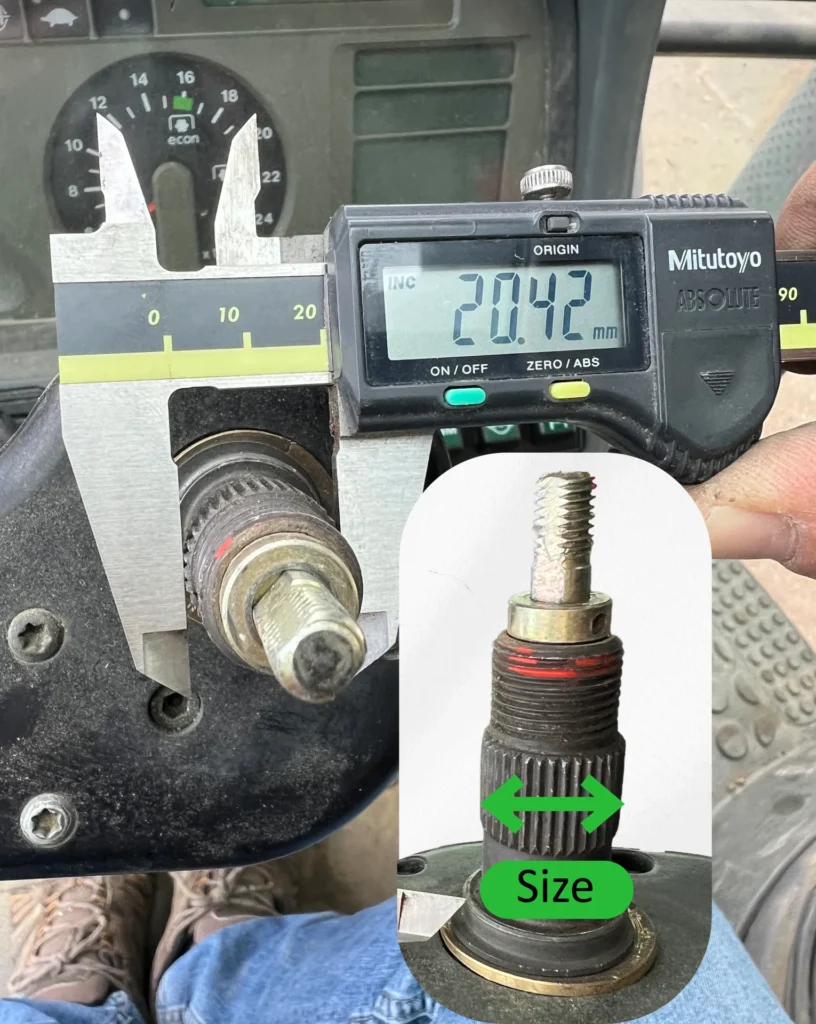
To ensure you select the correct adapter, the most reliable method is to remove the steering wheel and measure the diameter of the splined shaft, as shown in the image.
In most cases, the spline count is 36; therefore, the diameter is the determining factor. Based on our experience, dimensions are consistent across certain brands.
Models for which the data in the table below are highly reliable:
John Deere and newer machines from the CNH Group: A+
Claas and Massey Ferguson: N
| Adapter Model | Tractor Brands & Models | Adapters teeth no. | Adapters size |
|---|---|---|---|
|
A+ |
CNH group newer:
|
36 |
21.8-22.1 |
|
D |
|
36 |
20.4 |
|
K |
|
36 |
17.8 |
|
N |
|
36 |
15.8 |
|
B |
|
36 |
18.2 |
|
W |
|
36 |
18.5 |
|
F |
|
single key |
24.5 |
|
NH40 |
older ones:
|
40 |
17.7 |
|
T |
|
18 |
15.45 |
|
G |
RARE:
|
36 |
15.6 |
|
C |
|
single key (conical) |
23.33-25.4 |
|
BENZ- 72S |
|
72 |
23.5 |
Add an external 4G router to your kit if: